Audiogravity - The conductor of your music streamer
Projects | | Links: Audiogravity.app | User manual | UI — open source (MIT)
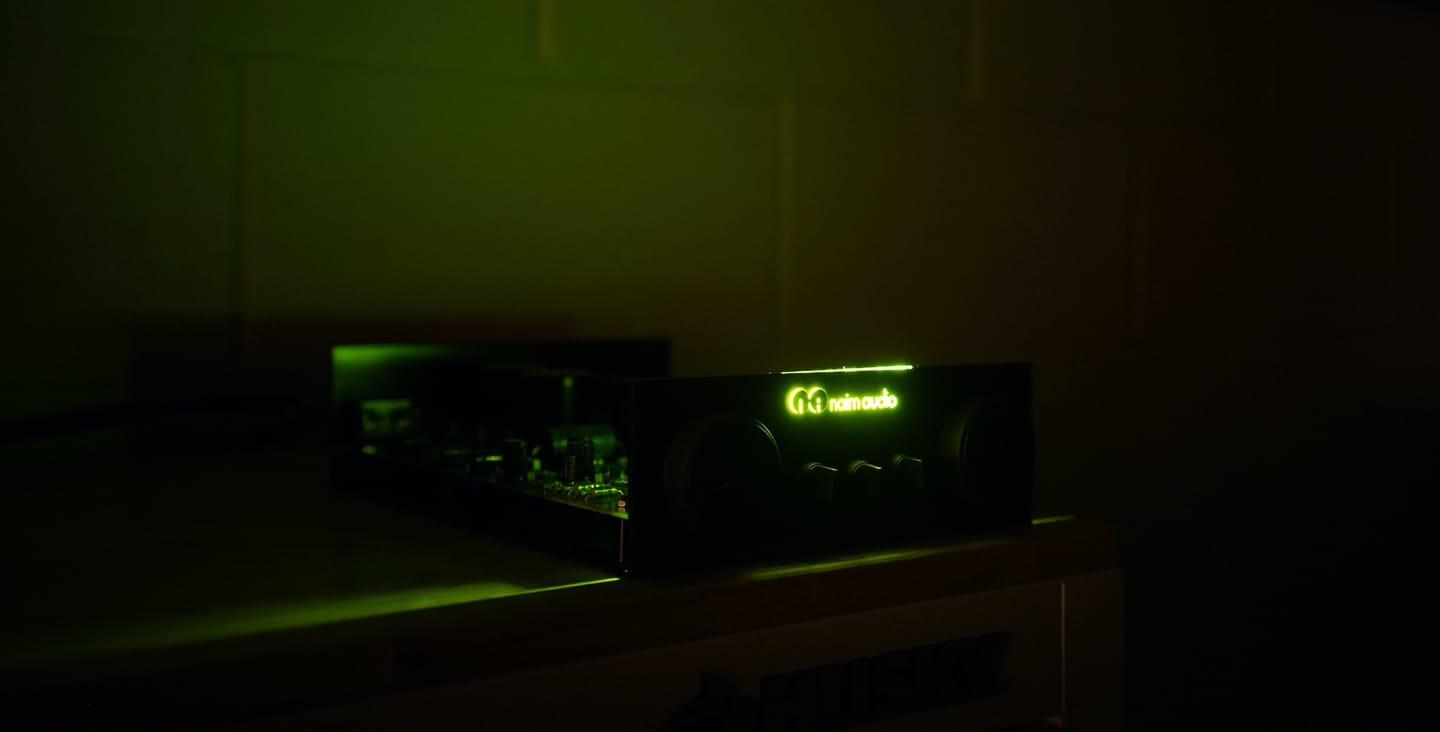
Audiogravity is the conductor of your music streamer. It orchestrates every audiophile engine already on your box — MPD, Roon Bridge, HQPlayer NAA, AirPlay, upmpdcli, UPnP — and every source you rely on (NAS, Qobuz, Tidal, HIGHRESAUDIO, internet radio, MinimServer), then tunes the Linux kernel underneath. One interface, from your phone. Total control.
- Audiogravity
Your streamer is your source. Audiogravity is the conductor.
Audiogravity
Your streamer is your source. Audiogravity is the conductor.
The audiophile streamer interface. MPD, Roon, HQPlayer, AirPlay, UPnP sources and renderers, internet radio — every player, every source, down to DSD and Hi-Res PCM. Send your library to any network renderer. Audiogravity coordinates each component of your stack, from the system to your Qobuz, Tidal and HIGHRESAUDIO libraries, without replacing any of them. One interface. Total control.
Audiogravity is a control app for your music streamer: a single browser/PWA interface — phone, tablet, laptop — that runs on a Linux host next to your Hi-Fi. It does not replace the audio engines audiophiles already trust: it installs, configures, drives and orchestrates them (MPD, upmpdcli, Shairport-Sync, HQPlayer NAA + DSP, Roon Bridge, network UPnP renderers), connects the content sources they rely on (NAS, Qobuz, Tidal, HIGHRESAUDIO, internet radio, MinimServer), and tunes the Linux kernel underneath.
The enemy of bit-perfect playback isn’t the players you trust. It’s the kernel scheduler interrupting your audio thread for 200 µs to handle a network IRQ.
Designed for DietPi (recommended), Raspberry Pi (aarch64) and Debian / Ubuntu (x86_64).
Editions
Audiogravity ships in three tiers. Trial gives full access for 30 days; Starter takes over automatically after that and stays free forever; a lifetime Pro licence permanently unlocks the deep audio-engineering surface.
| Edition | Price | Duration | Notes |
|---|---|---|---|
| Trial | €0 | 30 days · auto-activated on first run | Full access to every feature |
| Starter | €0 | Free · unlimited | Activates automatically when Trial expires |
| Pro | €49 | Lifetime · 1 machine | Bound to one installation; all v1.x updates included; preferential upgrade price for future majors |
Payment is by PayPal from Admin › Licence. Key delivered by email in seconds. Activate by clicking Licence Key, paste the key, confirm — the signed .lic file is bound to your device. No restart, no subscription.
License model. The .lic file is cryptographically tied to the machine’s Device ID (hardware fingerprint). Lost your file after an OS reinstall? Re-download it yourself from the self-service portal (purchase email + Device ID — no account needed). Moving to a new machine? License reset available on request — contact contact@audiogravity.app.
Open core. The UI is open source (MIT). The core engine remains proprietary under EULA (French law).
Feature Overview — 21 modules
Starter (free)
- Profiles — one-tap orchestration: “Roon + HQPlayer” for serious listening, “MPD + upmpdcli” to expose the streamer as a UPnP renderer (BubbleUPnP, Kazoo, OpenHome), “AirPlay only” for background music. Each profile lists the exact services to start / stop; conflicts resolved automatically; atomic activation with detailed toast on failure.
- Services — live monitoring: start / stop / restart individual systemd units. Instant CPU, memory, network and disk with LOW / MEDIUM / HIGH thresholds. 60 s sparklines. Throughput reference (CD ≈ 1.4 MB/s, Hi-Res ≈ 10 MB/s, DSD64 ≈ 22 MB/s).
- Audio Software — install, update, dry-run: MPD, Shairport-Sync, upmpdcli, HQPlayer NAA, Roon Bridge — one-click install and update with live SSE deployment logs. Architecture-aware (x86_64, aarch64).
- System — hardware dashboard: every ALSA card, USB interface, subdevice and hardware capability the kernel sees — without
aplay -lorlsusb. CPU, temperature, memory, disk, network at a glance. - Audio Services Config — safe in-place editing: guided setup detects DAC + music library and generates minimal bit-perfect configs for MPD, AirPlay and UPnP. Form view + full text editor with syntax highlighting (JSON, INI, XML, libconfig). Live validation before save, side-by-side diff, automatic timestamped backup.
- Users & RBAC: Admin / User / Guest roles. WebAuthn passkeys (Face ID, Touch ID, fingerprint, YubiKey), multiple per user. Session history. Persistent or session-only login.
- Internet radio: on the same transport as your FLAC library — same output zone, same Hi-Fi readout, live metadata, cover art. Curate stations, filter the catalogue down to Hi-Res.
- Push notifications: service down, CPU critical temperature, update available, profile activated — even when the PWA is closed.
- Auto-update with rollback: update banner in Admin, one click + password, live progress across the restart. Automatic rollback if health-check fails. No terminal.
Pro (€49 lifetime)
- Unified transport across every player: one set of controls, every engine simultaneously — MPD, Roon, HQPlayer, AirPlay, UPnP. Stream origin badge always shows where the audio is coming from. Live Hi-Fi readout (format, sample rate, bit depth, instantaneous bitrate) refreshes on every track change. Queue reads every source with per-source badges and filter.
- Live signal-path visualization: interactive SVG graph of the entire chain — every source, every active audio process, down to the DAC. Each link shows exact stream format (PCM / DSD · 44.1 kHz → 768 kHz · 16 → 32 bit), bit-perfect badge, per-link latency, live play state. Click a link to hot-reroute — gapless on MPD; AirPlay warns first (its receiver has to restart).
- High-resolution library: Roon, MPD, MinimServer, Qobuz, Tidal, HIGHRESAUDIO from one interface. Album view, full-text search, direct playback with cover art. Star an album to favourite it on its streaming service; tap an artist to open their albums across every source. Local NAS/USB files cast to a network renderer, bit-perfect.
- Audio priority — end the jitter:
SCHED_FIFO/SCHED_RRscheduling, per-service priority (1 → 99, e.g. MPD at 80, AirPlay at 60), CPU affinity (dedicated cores),MEMLOCK(audio stays in RAM, never swapped mid-track),RTPRIOceiling, CPU governor (Performance / Powersave / Schedutil / Ondemand) — all written as systemd drop-in files beside the originals, upgrade-safe, one-click revert. - Latency measurement (cyclictest): run it from the browser, read the result in microseconds. Reference achieved: max 47 µs on a tuned Pi 5 with FIFO/80 + CPU pinning + MEMLOCK. Each run timestamped and archived.
- Thermal map: per-core heat map. THROTTLED badge the instant the machine slows itself down — before your ear catches it.
- HQPlayer DSP remote: change interpolation filter, noise shaper, output mode and volume without leaving the couch. Auto-discovered on the LAN. Play any UPnP library track through HQPlayer’s DSP engine.
- UPnP Control Point: discover every renderer on the network — network amps, dedicated streamers, DLNA speakers — and drive them directly. Bit-perfect, full resolution. Live “Up next” strip.
- Auto-discovery: MPD, Roon Bridges, UPnP servers, AirPlay receivers, HQPlayer — SSDP + service-specific probes.
- Network stability tests: iPerf3 throughput + jitter, high-precision ping. Verify the link is stable enough for DSD64/128/256.
Where it sits — five layers, three owned, two managed
Audiogravity does not compete with audio engines — it orchestrates them, installs and configures them, and tunes the OS underneath.
| # | Layer | Components | Role |
|---|---|---|---|
| 5 | User Interface | Browser · phone · tablet · PWA | owns |
| 4 | Control / Orchestration | Source switching · transport · volume · UPnP renderer control · monitoring | owns |
| 3 | Content Sources | NAS · Qobuz · Tidal · HIGHRESAUDIO · Internet radio · MinimServer | manages |
| 2 | Audio Engines | MPD · Roon Bridge · HQPlayer NAA · AirPlay · upmpdcli · UPnP renderers | manages |
| 1 | OS / Kernel | RT scheduling · CPU pinning · IRQs · ALSA | tunes |
How it compares
| Capability | Audiogravity | Roon | Volumio | Moode | HQPlayer Embedded | JPLAY iOS |
|---|---|---|---|---|---|---|
| Product nature | Streamer (orchestrates audio engines) | Streamer + cloud platform | Streamer | Streamer | Streamer (DSP focus) | Controller only |
| Multi-player orchestration (MPD + Roon + HQPlayer + AirPlay) | ✓ | partial | partial | — | partial (HQPlayer) | — |
| Native Tidal / Qobuz / HIGHRESAUDIO (vendor APIs, no UPnP required) | ✓ (Pro) | ✓ | partial (via upmpdcli) | — | — | — |
| UPnP MediaServer browse & search (NAS via MinimServer, upmpdcli) | ✓ | — | ✓ | ✓ | ✓ | ✓ |
| UPnP MediaRenderer control (push to external streamer) | control point | ✓ | ✓ | ✓ | — | — |
| Acts as UPnP MediaRenderer (controllable from JPLAY / BubbleUPnP) | via upmpdcli | partial (RAAT) | ✓ | ✓ | ✓ | — |
| Roon Bridge integration | native | — | — | — | — | — |
| HQPlayer integration | DSP remote + NAA | — | — | — | as endpoint | — |
| AirPlay receiver | ✓ | — | ✓ | ✓ | ✓ | — |
| System tuning for audio (FIFO, MEMLOCK, CPU affinity) | ✓ | — | — | — | — | — |
| Latency measured in µs (cyclictest from the UI) | ✓ | — | — | — | — | — |
| Live signal-path visualization | ✓ | partial | — | — | — | — |
| Config editor (diff + validation) | ✓ | — | partial | partial | — | — |
| Per-source bit-perfect lock (DSD volume protection) | ✓ | ✓ | partial | — | ✓ | partial |
| Internet radio (Radio Browser + custom stations) | ✓ | — | ✓ | — | — | — |
| PWA / web-installable | ✓ | — | — | ✓ | ✓ | — |
| WebAuthn / biometric login | ✓ | — | — | — | — | — |
| Self-hosted (no cloud account) | ✓ | — | ✓ | ✓ | ✓ | account required |
| Pricing | Free / €49 lifetime | $14.99 / mo or $829.99 lifetime | Free / €69.99 / yr | Free | €265 lifetime | $49.99 / yr or $199 lifetime |
Comparison based on public information from each vendor’s documentation as of 2026.
Audio priority — example drop-in
A concrete example of what Audiogravity writes for MPD when you enable RT priority:
# /etc/systemd/system/mpd.service.d/audio.conf
# written by Audiogravity · upgrade-safe drop-in

[Service]
CPUSchedulingPolicy=fifo
CPUSchedulingPriority=80
CPUAffinity=2 3
LimitMEMLOCK=infinity
LimitRTPRIO=95
Nice=-19

# verified by cyclictest
# max latency 47 µs · ✓ bit-perfect
Product Tour
Profiles — one-click orchestration
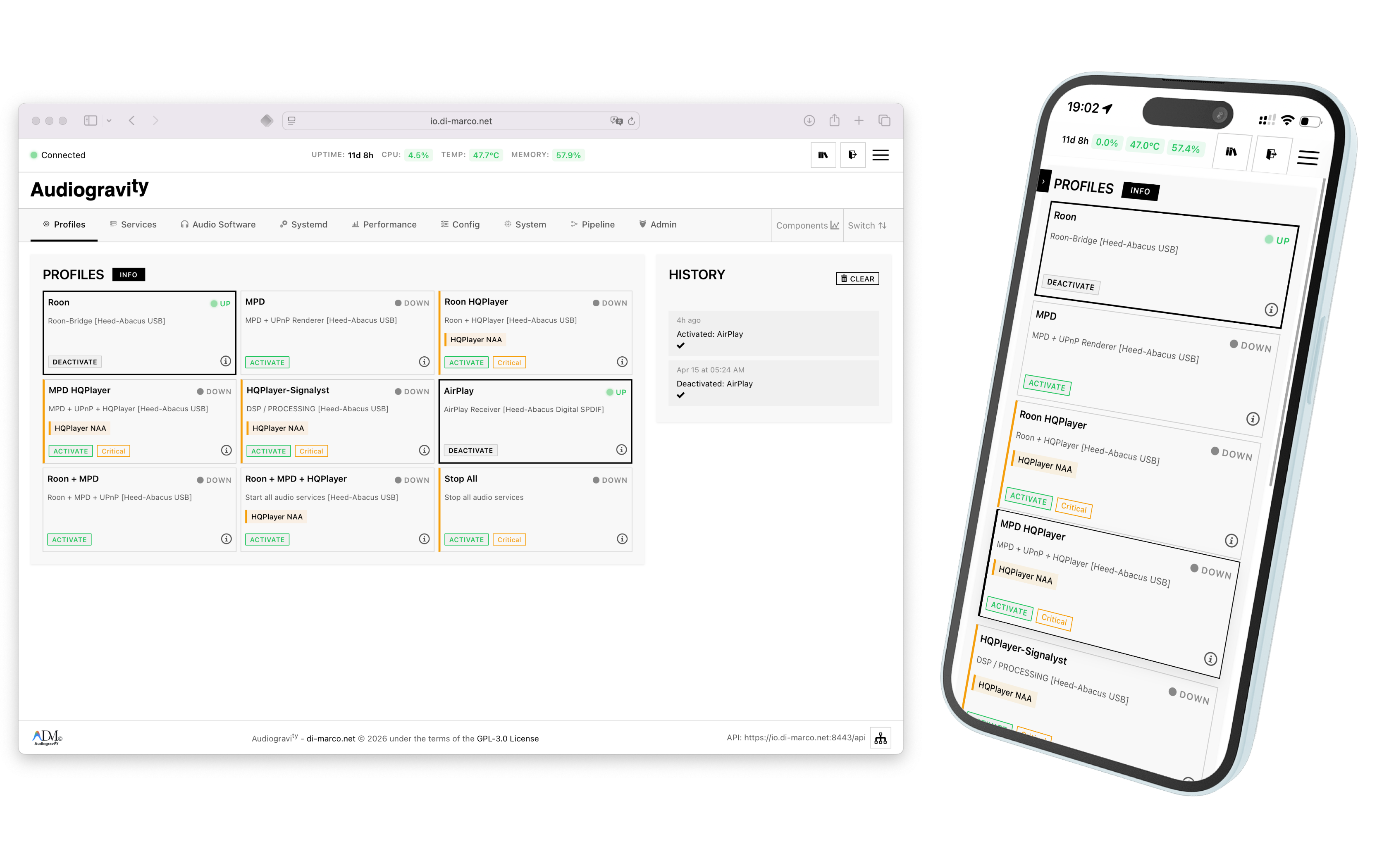 Profile tiles on laptop and mobile
Services — granular control & sparklines
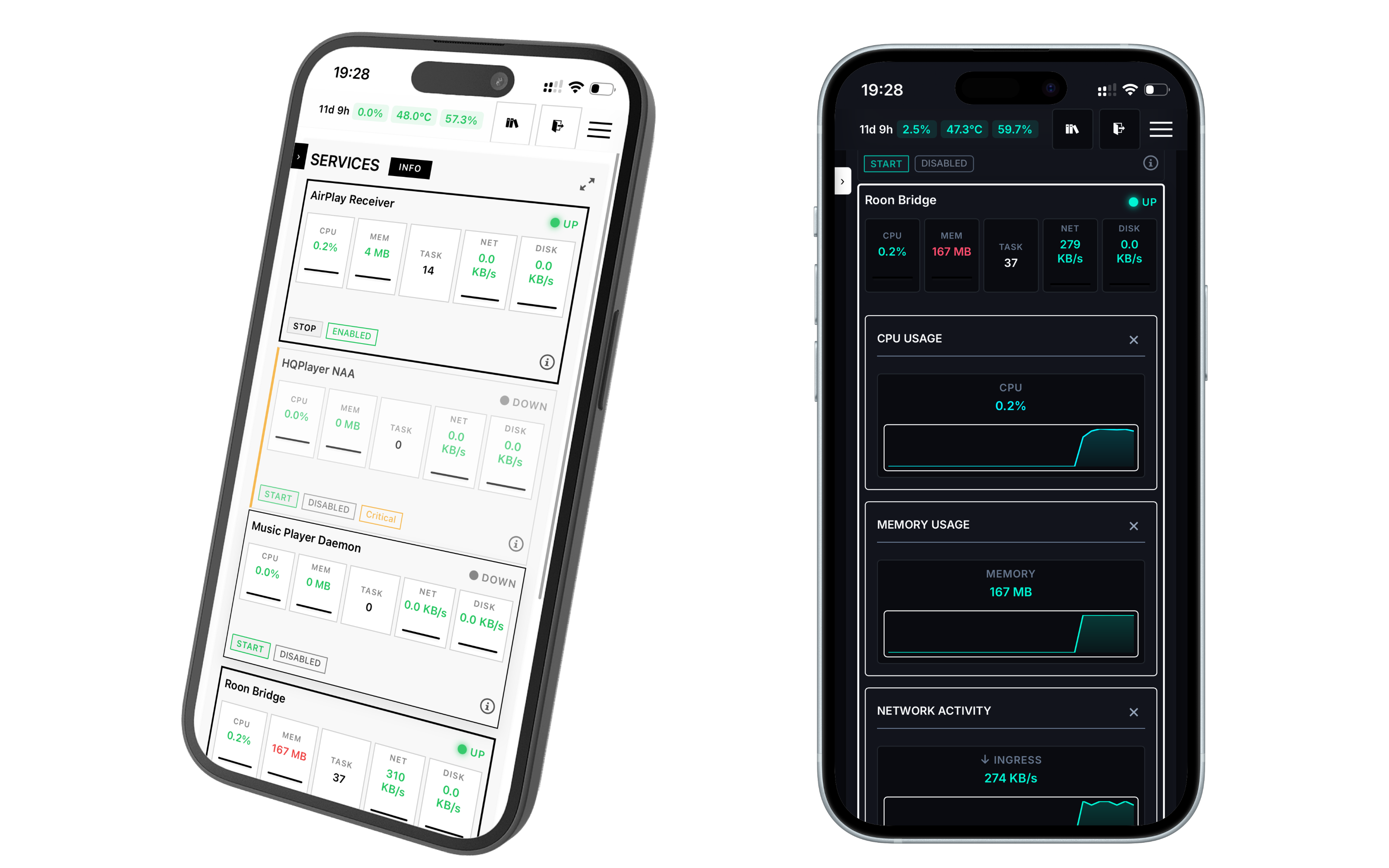 Services tab with real-time CPU / memory / I/O per unit
Audio Software — install & update
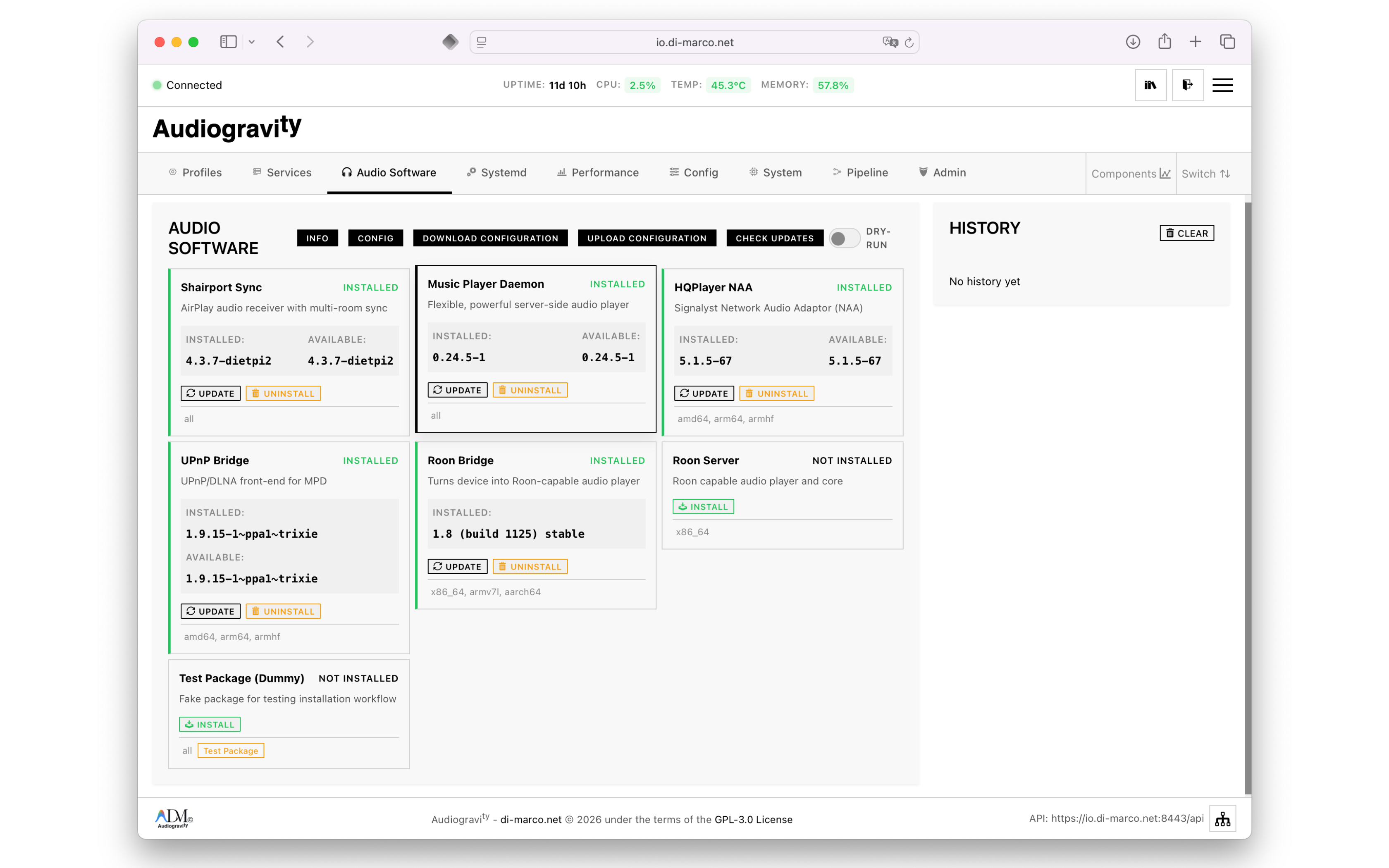 One-click install, update and uninstall for MPD, Shairport-Sync, Roon Bridge, HQPlayer NAA, upmpdcli…
Audio Pipeline (Pro) — interactive signal path
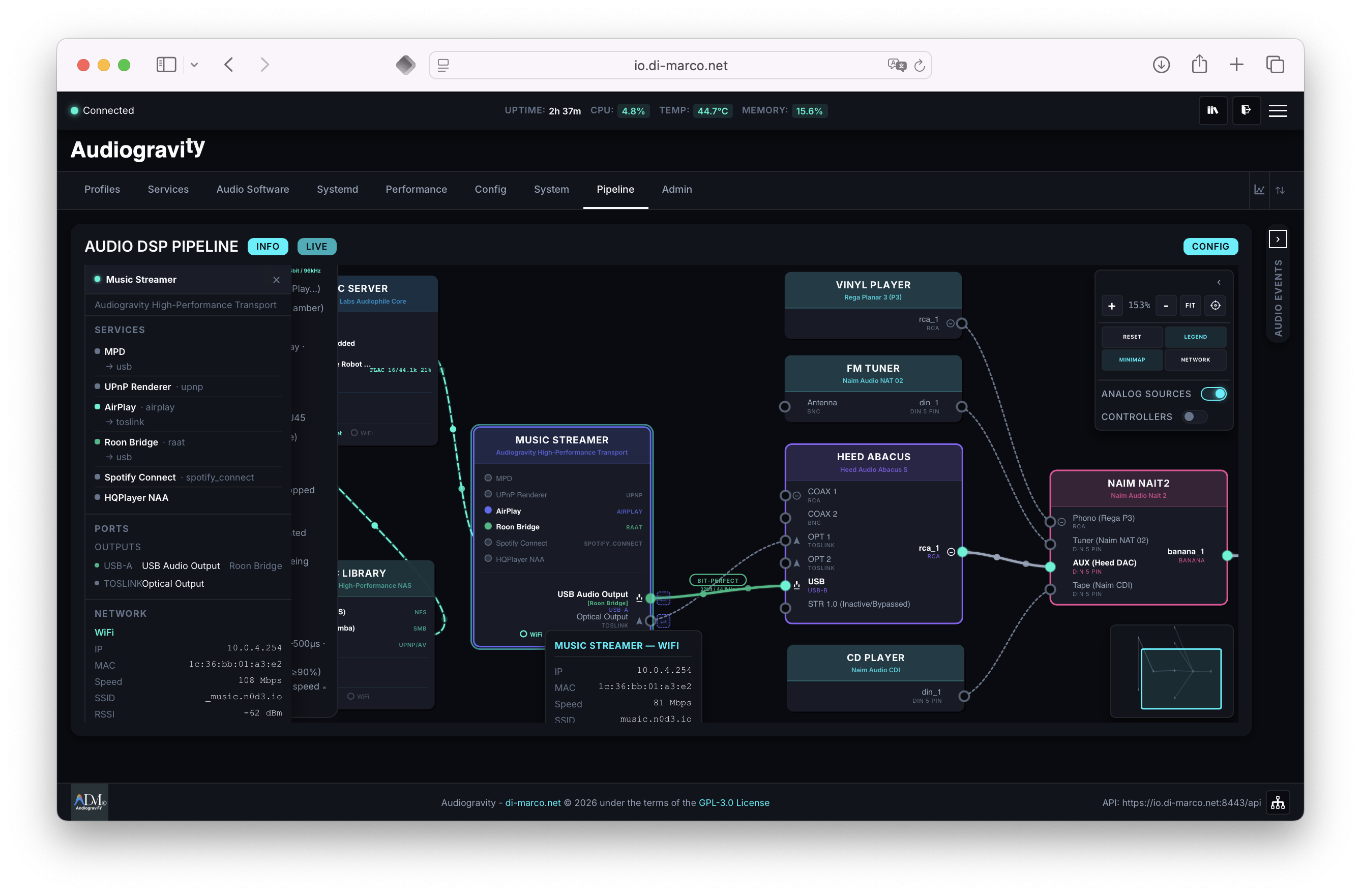 Live SVG topology of the entire Hi-Fi chain — pan, zoom, minimap, hot-reroute
Performance (Pro) — measure & tune
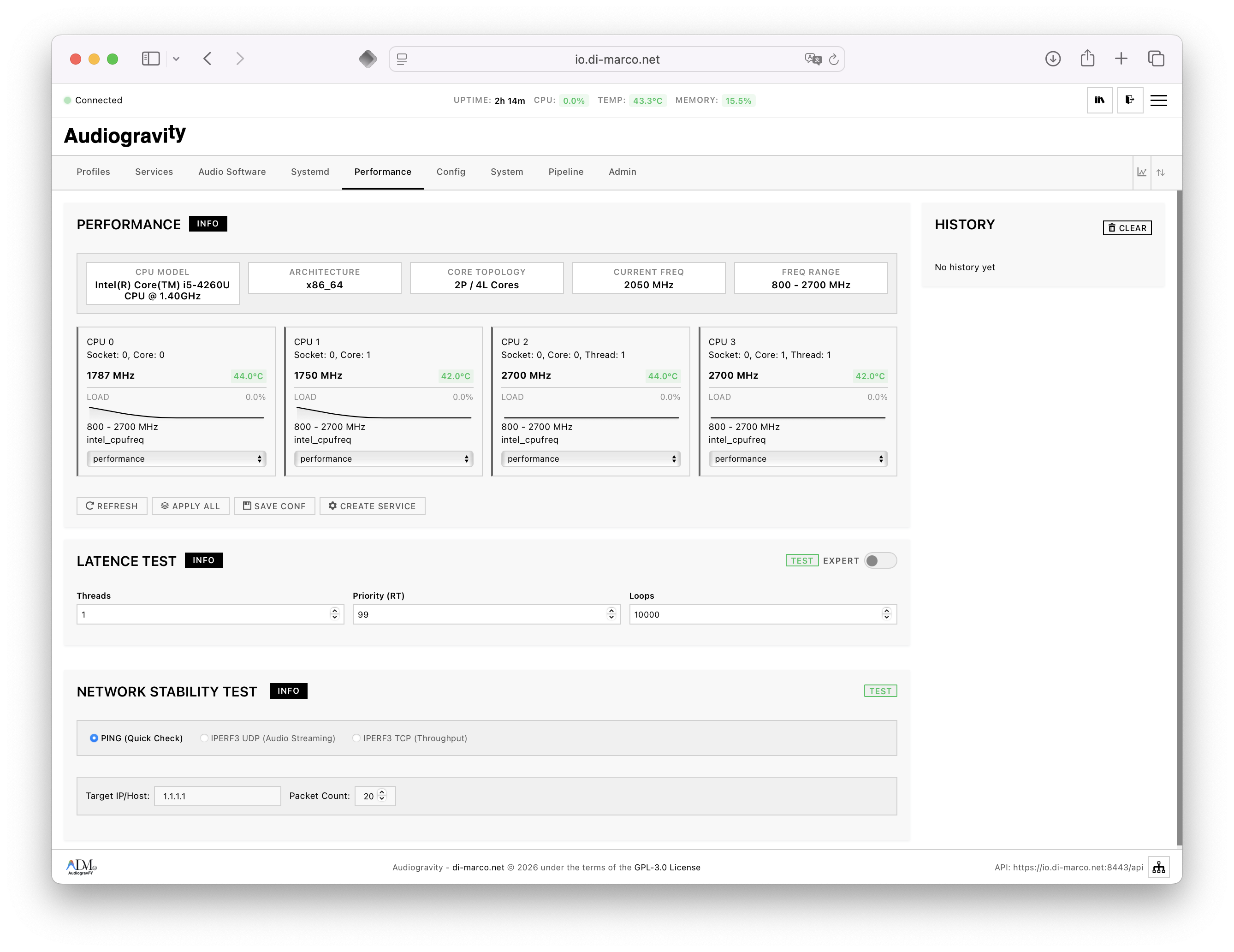 Per-core governor control and thermal mapping
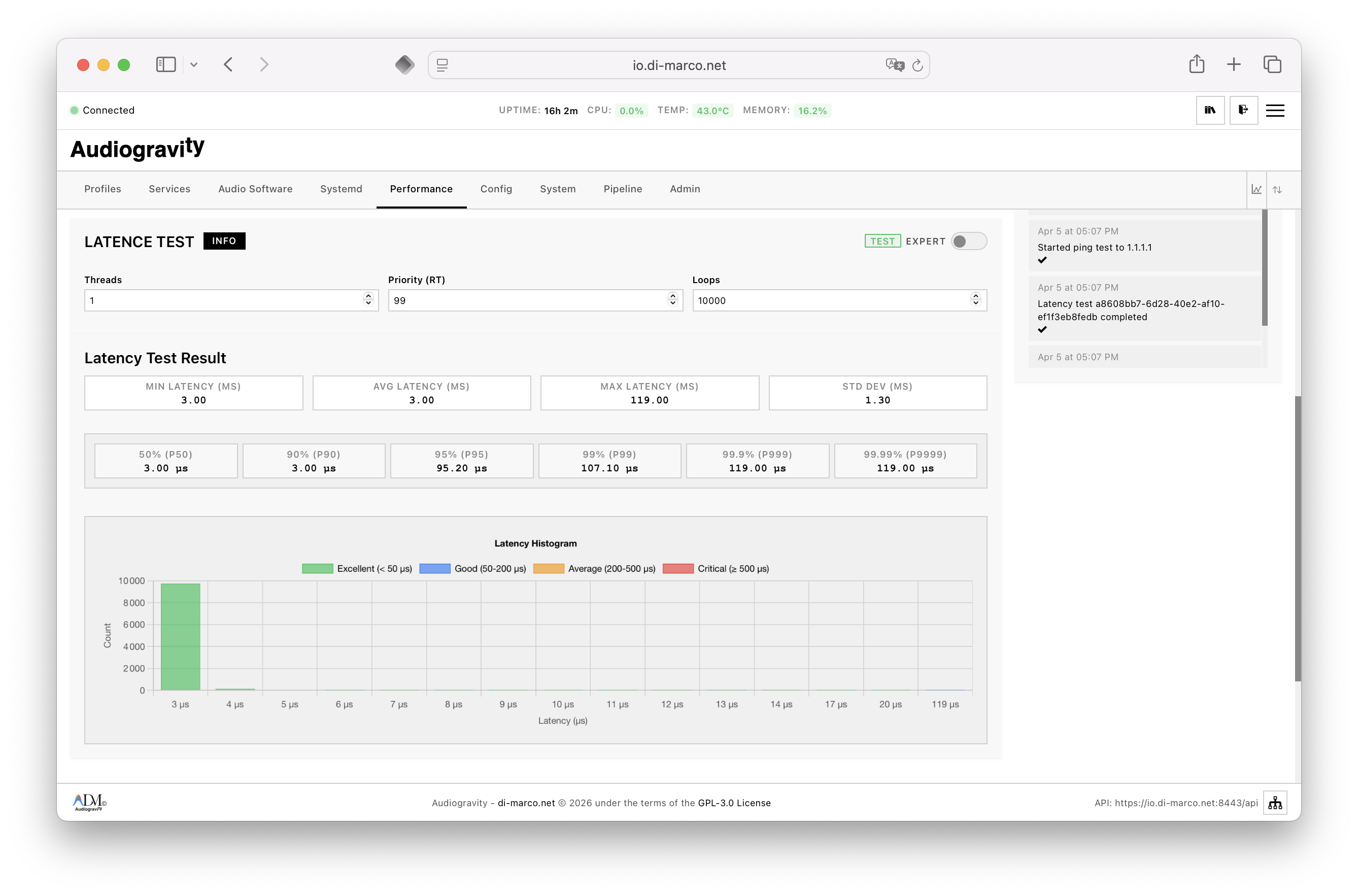 Cyclictest latency histogram — run from the browser, archived with timestamp
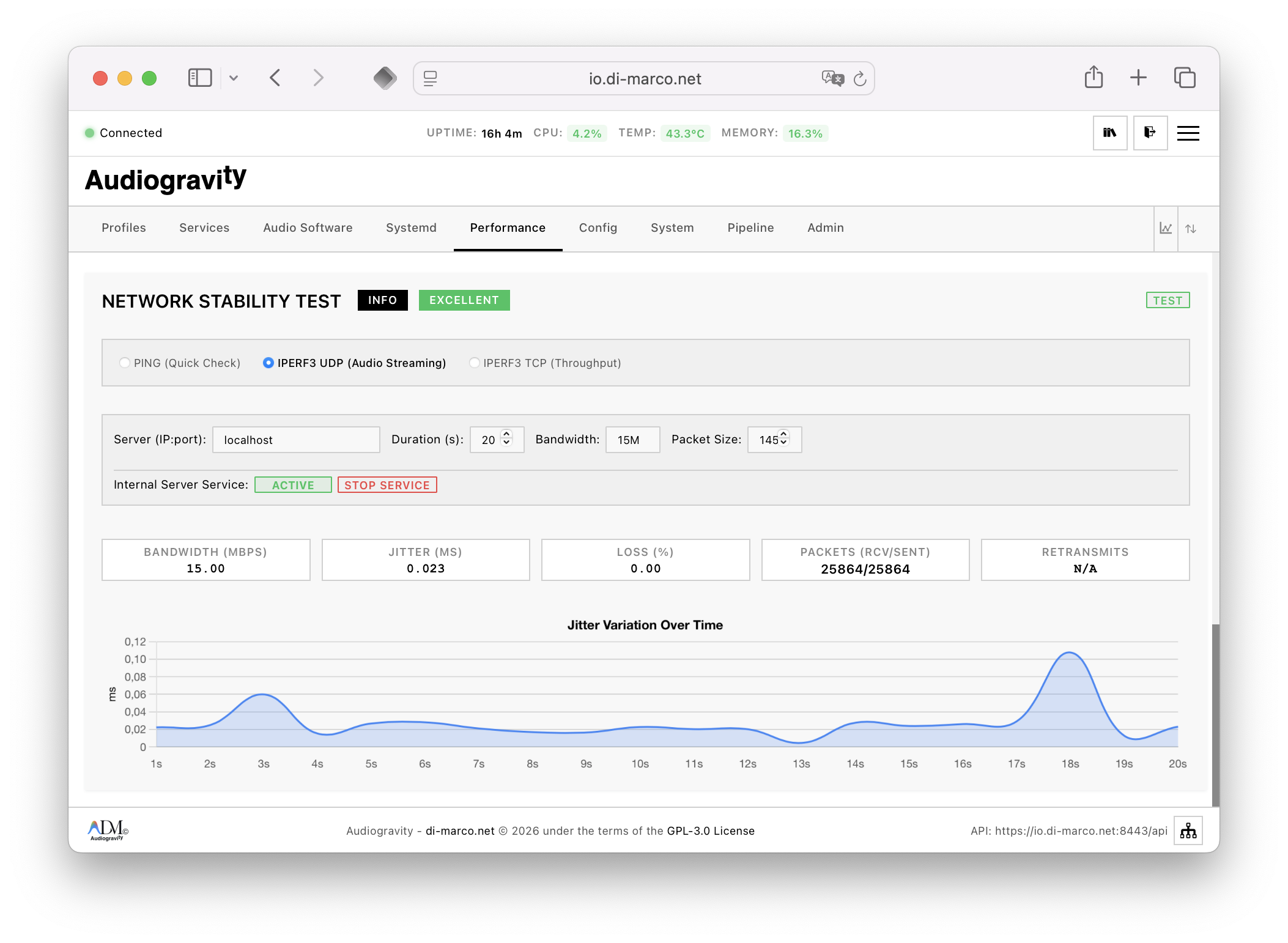 iPerf3 stability test
Systemd — safe RT drop-ins
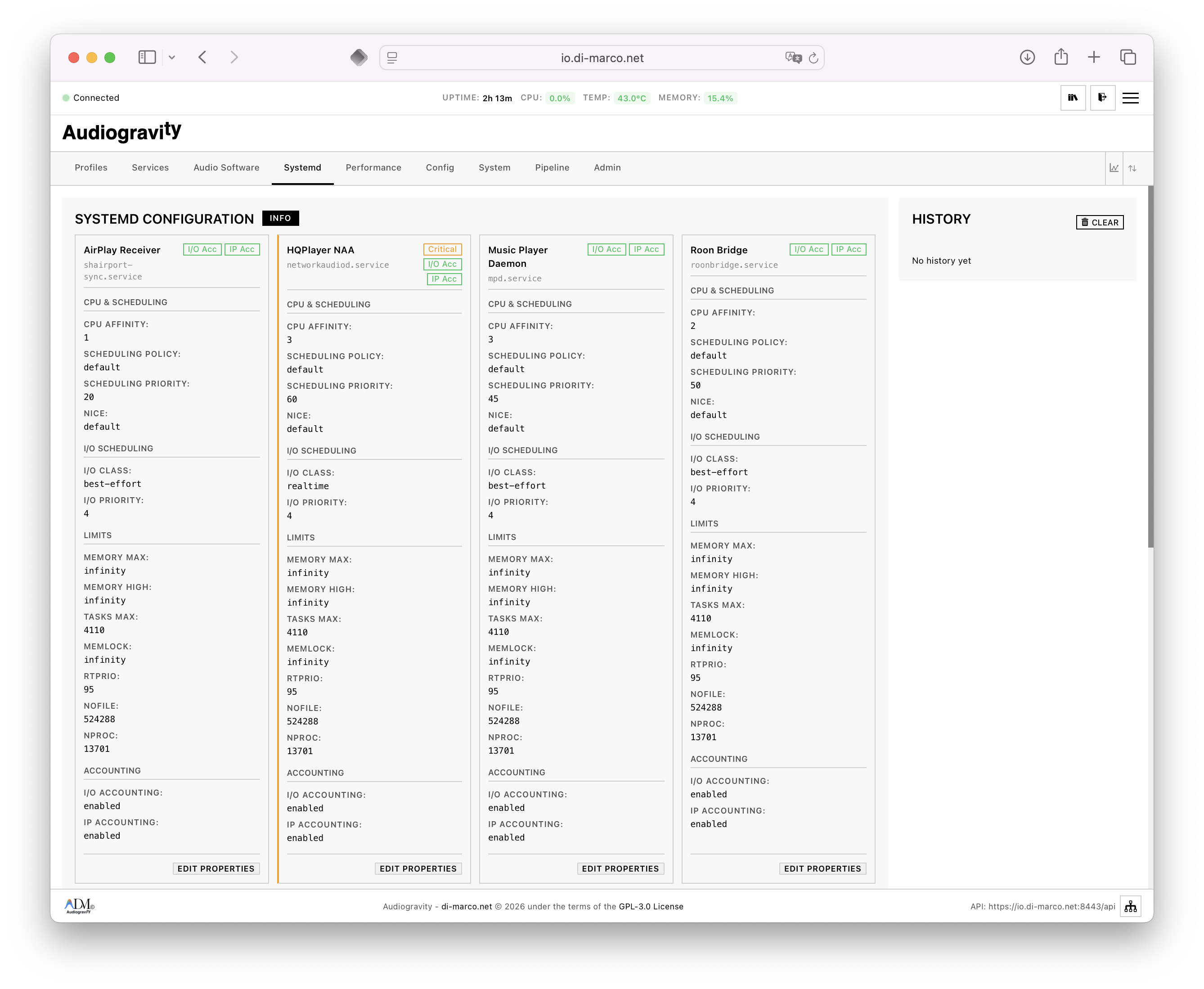 CPU affinity, RT scheduling, I/O priority — vendor unit files stay untouched
System dashboard
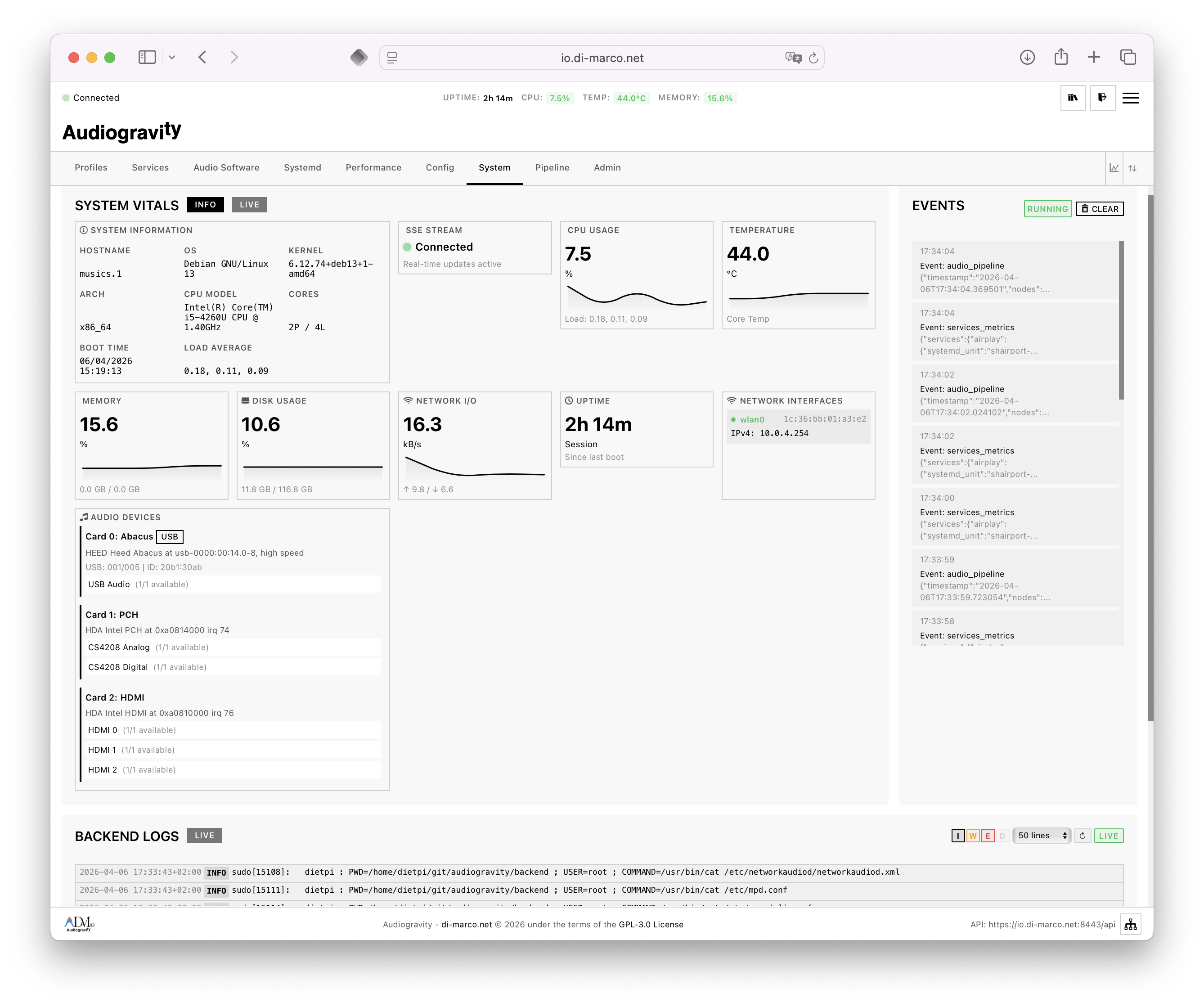 Kernel, uptime, partitions, secure reboot / shutdown / backend restart
Admin & RBAC
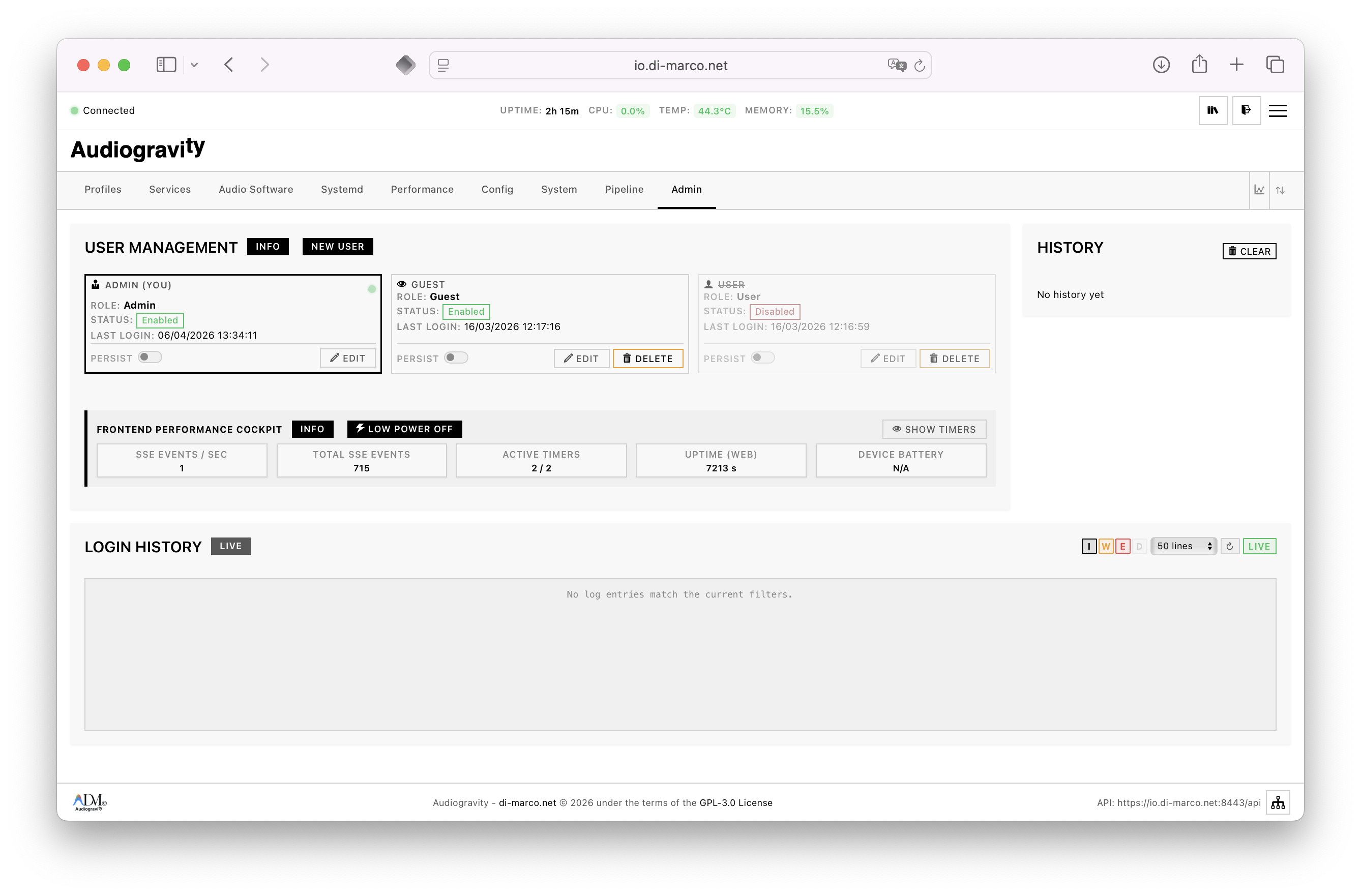 Admin / User / Guest roles — enforced at API and UI level
Configuration editor
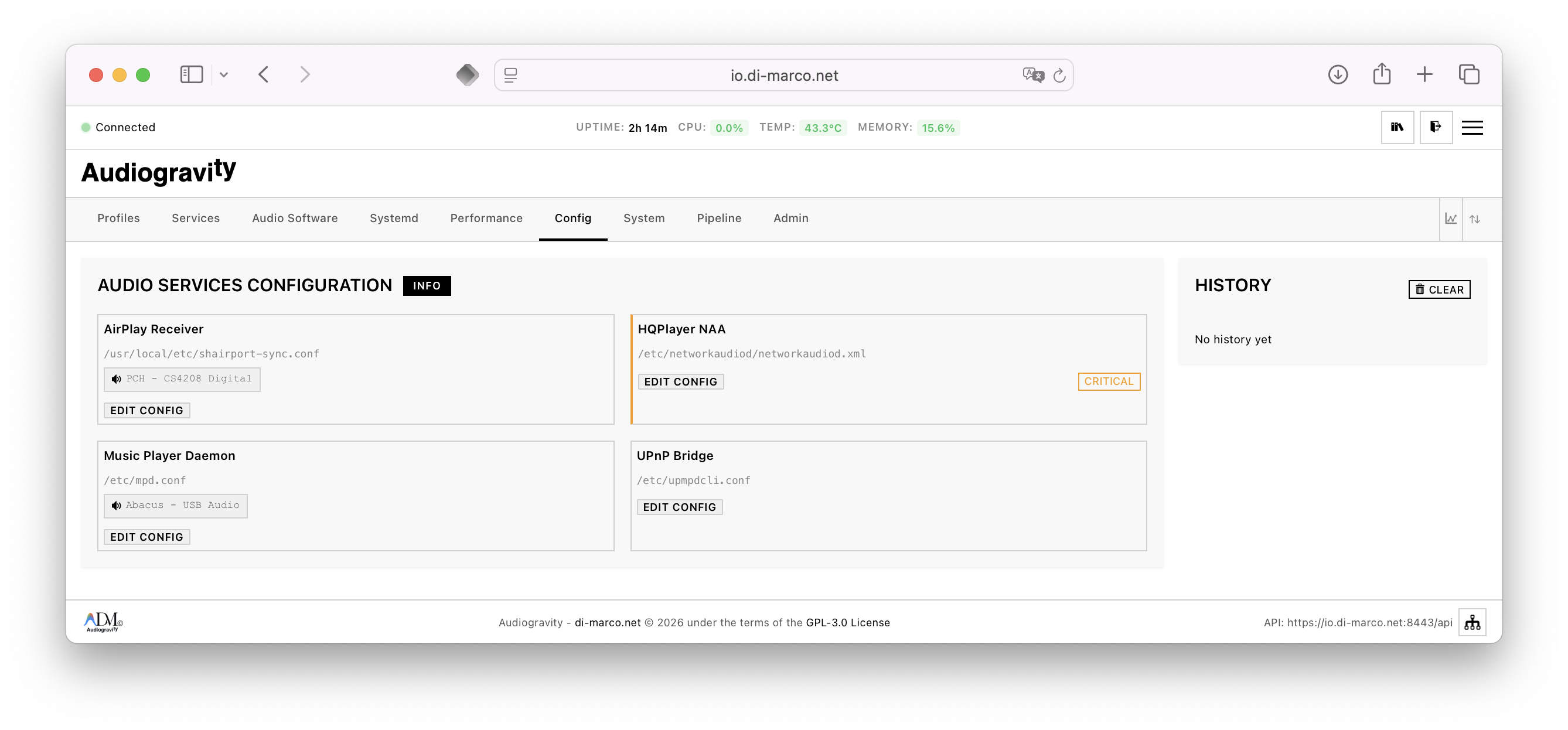 Structural editor for services, profiles, topology — with validation and diff
Architecture
graph LR
    subgraph CLIENT["Browser / PWA"]
        UI["Lit 3.3 Web Components"]
        SSE_C["SSE Client"]
        SW["Service Worker\n(offline / push)"]
    end

    subgraph API["FastAPI Backend (core)"]
        REST["REST API\nX-API-Key + JWT RBAC"]
        SSE_S["SSE Telemetry\nadaptive 2s→10s→30s"]
        MOD["21 Modules"]
    end

    subgraph SYS["Linux System"]
        DBUS["D-Bus / systemd\ndbus-fast"]
        ALSA["ALSA"]
        CONF["/etc/audiogravity/*.json"]
    end

    UI -->|"HTTP/REST"| REST
    UI -->|"EventSource"| SSE_S
    SSE_C --> SSE_S
    REST --> MOD
    SSE_S --> MOD
    MOD -->|"native D-Bus"| DBUS
    DBUS -->|"systemd units"| SYS
    MOD -->|"ioctl / procfs"| ALSA
    MOD --> CONF
Tech stack. Python 3.13 · FastAPI · Uvicorn · uvloop · dbus-fast · Pydantic v2 · orjson · JWT HS256 · BCrypt · WebAuthn (FIDO2 / Passkeys) · slowapi · Lit 3.3 · Vite 7 · CodeMirror · Service Worker · Web Push (VAPID).
Mobile · PWA · WebAuthn
An app on your phone — without an app store.
- Install: Safari (iOS) or Chrome (Android) → Add to Home Screen → full-screen PWA, dedicated icon.
- Login: Face ID, Touch ID, Android fingerprint, Windows Hello, YubiKey.
- Multi-device: several passkeys per user, managed one-by-one.
- Push: notification when a service fails, CPU hits critical temperature, or an update ships — even with the app closed.
- Touch targets: WCAG 2.1 AA · 44 px minimum · responsive layout.
On iOS, only Safari supports PWA installation, and PWA installation is what enables push notifications.
Installation
One command on your DietPi / Debian box — core and interface together, keys generated, services started. Typically under five minutes from curl to the interface.
Early-access token required. During Early Access, a GitHub token is shared with approved testers. Request one.
Recommended — all-in-one (core + ui on one box)
curl -fsSL https://audiogravity.app/install.sh \
  | sudo bash -s -- --token ghp_xxx
Then open the interface:
https://<ip-of-your-streamer>
On first run, a 30-day trial activates automatically. Sign in as admin / admin123 and change the password immediately from Admin › your card.
Advanced — split core and UI
Run each installer on its target host:
curl -fsSL https://audiogravity.app/install-core.sh | sudo bash -s -- --token ghp_xxx
curl -fsSL https://audiogravity.app/install-ui.sh   | sudo bash -s -- --token ghp_xxx
One-click self-update updates a co-located core + ui together. If they live on different hosts, update each side separately.
Optional flags (core installer)
| Flag | Effect |
|---|---|
--vapid-email you@example.com | Contact address for Web Push (VAPID sub). Omitted → placeholder, push stays basic. |
--public-url https://your.domain | Enables passkeys (WebAuthn) and derives the WebAuthn origin / RP ID. Passkeys need a real HTTPS domain — they do not work over a bare IP. |
curl -fsSL https://audiogravity.app/install-core.sh | sudo bash -s -- \
    --token ghp_xxx \
    --vapid-email you@example.com \
    --public-url https://audiogravity.example.com
The installer generates a complete, working config (API key, session key, VAPID keys). You do not edit
.envby hand for the standard setup. The one exception is Roon, enabled in.env.
HTTPS — for passkeys and push
Passkeys and push both require the browser to see Audiogravity on a real HTTPS domain — a bare IP or self-signed cert won’t do. The recipe for a home box, without exposing anything to the internet:
- A domain name you control, with a record pointing at the box’s LAN address (e.g.
ag.example.com → 192.168.1.30). Name only has to resolve on your LAN. - A real cert via Let’s Encrypt DNS-01 (no port needs opening).
- A reverse proxy (nginx / Caddy / Traefik) terminating TLS in front of Audiogravity in plain-HTTP mode (default port
8080). --public-url https://ag.example.comon the core installer.
Caddy handles steps 2–3 in two lines.
Uninstalling
sudo /opt/audiogravity/uninstall.sh          # core — keeps your configuration
sudo /var/www/audiogravity-ui/uninstall.sh   # ui
Keeps /etc/audiogravity (topology, profiles, audio settings) and /var/backups/audiogravity. Reinstall picks up where you left off. Add --purge to remove those too. Audio software installed from the Audio Software page (MPD, Shairport-Sync, upmpdcli, HQPlayer NAA, Roon Bridge) is never removed — use your package manager.
Updates
From the Admin tab: banner → one click + password → the box downloads, swaps and health-checks the new version with live progress across the restart. Automatic rollback to the previous version if anything fails. No terminal, no re-running the installer. All v1.x updates included with the Pro licence.
Privacy & Security
- No account. No telemetry. Credentials and system state stay on your network.
- 0 cloud dependencies for playback. Only cover-art and radio-catalogue lookups query public metadata services. Licence activation and periodic validation require internet.
- Dual-layer auth: mandatory
X-API-Key+ JWT with RBAC. Optional mTLS via nginx PKI. - WebAuthn / FIDO2 / Passkeys (Face ID, Touch ID, YubiKey, Windows Hello).
- Rate limiting on authentication routes.
- Secure defaults: production startup refuses insecure secrets;
.envpermissions enforced to600; JWT insessionStorageby default (cleared on tab close).
Documentation
A fully illustrated User Manual covers the whole journey — installation, first run, listening, streaming, outputs & engines, administration, updating, troubleshooting, glossary, FAQ. Readable inside the app (the Manual tab, always up to date) and online. One-page Quick Start.
License
Core: proprietary — EULA (French law).
UI: open source, MIT — fork it, contribute, or build on it.
© 2026 Audiogravity · Made in 🇪🇺 · contact@audiogravity.app
Acknowledgments
Developed with the assistance of Claude.ai (Anthropic).